type the task. the agent spawns.
Pick the folder with ctrll and who runs it with tab. Type the task and press enter: the agent starts working on it right away and shows up in the project's group, with its timer and a line saying what it's doing.
Claude Code, Codex, OpenCode, Kilo, Antigravity, Grok, Qwen Code and Kimi Code side by side, across all your projects. Octo shows who's working, who's done and who's waiting for you, and takes you straight there with a single key.
claude codecodexkiloopencodeantigravitygrok buildqwen codekimi code
and your terminalpowershellbashzshwindowslinuxmacos
Ten tabs, six projects. You flip between them to find out who finished, who got stuck and who asked for approval twenty minutes ago.
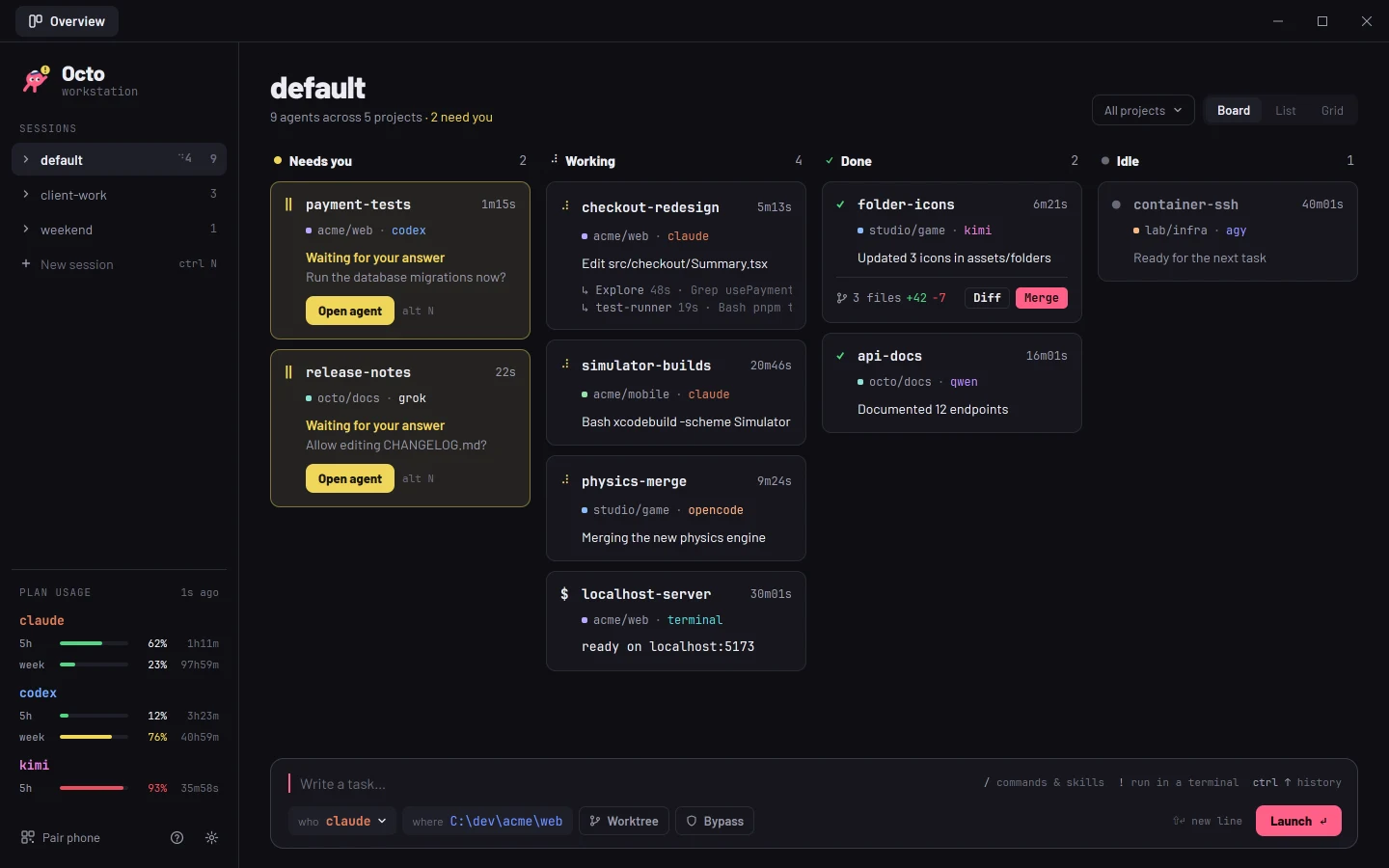
Octo brings every agent from every project into one window, grouped by folder, with each one's status live. When one of them needs you, it lets you know.
Pick the folder with ctrll and who runs it with tab. Type the task and press enter: the agent starts working on it right away and shows up in the project's group, with its timer and a line saying what it's doing.
When an agent you're not looking at asks for approval or finishes, Octo chimes, shows a notification and the window title counts who's waiting, even with Octo in the background.
Jumps straight to the agent that's been waiting the longest, from any screen, even from inside another agent. Want it on your phone? ctrlp pairs it, end-to-end encrypted, and a notify_command sends the alert through ntfy or wherever you like.
With ctrlt, each agent spawns in its own git worktree, on the orkai/<name> branch. Multiple agents work on the same repository without stepping on each other. /diff shows what changed; /merge brings it into your branch.
Each agent runs in its own process, which owns its terminal: closing or updating the interface takes no one down. After a reboot, ctrlr resumes every conversation right where it left off.
Hooks, plugins and each agent's own protocol tell Octo when it's working, waiting for you or done. No guessing from screen text: a reply that ends with “Would you like to…?” isn't mistaken for a question.
Hooks only record the event type. Your prompts, commands and responses never touch the disk.
The 5-hour, weekly and monthly windows (or the balance) of every agent you're logged into, with a countdown to the reset. Green, yellow from 70%, red from 90%. Agents you're not logged into don't show up.
/Each agent's skills and commands show up in autocomplete. /skill args starts an agent that invokes the skill right away.
The subagents that Claude Code and Codex spawn show up right below their agent, with their description and the tool in use.
!command!npm run dev runs the command in a new terminal, without changing who runs your next tasks.
Ran claude inside a terminal? Within 2 seconds it shows up in the overview with its type, status and subagents.
Every Claude Code session started by Octo opens with Remote Control on: pick it up in the Claude app or at claude.ai/code.
Every new build is verified by size and SHA-256 before it replaces the executable. Running agents aren't affected.
Octo never touches any of your config files. Hooks, plugins and environment variables apply only to the process it launched, and add to your own.
who | Agent | Program | Exact status | Usage in overview | Resume after reboot |
|---|---|---|---|---|---|
claude | Claude Code | claude | hooks (--settings) | 5h and weekly | --resume <id> |
codex | Codex | codex | notify | 5h and weekly | codex resume <id> |
kilo | Kilo CLI | kilo | event plugin | balance (funds) and Kilo Pass | --session <id> |
opencode | OpenCode | opencode | event plugin | OpenCode Go (5h and weekly) | --session <id> |
agy | Antigravity CLI (successor to Gemini CLI) | agy | OSC 7501 | 5h and weekly | --conversation=<id> |
grok | Grok Build | grok | window title | weekly or monthly | --resume=<id> |
qwen | Qwen Code | qwen | hooks (system defaults) | no usage API | --resume <id> |
kimi | Kimi Code | kimi | screen | 5h, weekly or monthly | --session <id> |
terminal | PowerShell, bash… | shell | output activity | — | reruns the command |
Each agent runs inside its own detached holder process, which owns the pseudo-terminal (ConPTY on Windows, PTY on Unix). The interface just connects to them.
Closing, restarting or updating Octo takes down no agent. When you open it again, it reconnects to all of them.
Agents show up as interrupted and ctrlr relaunches each one in its folder, resuming the conversation.
Every agent's full output is recorded, with rotation, and the orkai CLI prints it with orkai logs <id>.
try it: press enter, tab or altn now
orkai ls [-s session]            lists agents with their live state
orkai new -k <agent> -C <folder> starts an agent with a task
orkai send <id> <text...>        types into the agent and presses enter
orkai attach <id>                attaches this terminal to the agent
orkai logs <id> [-n lines]       the agent's recorded transcript
orkai recover [-s session]       relaunches interrupted agents
orkai update downloads and installs the newest versionHolders listen on localhost only, on a random port.
One token per agent, stored only in your data folder.
of your config files changed. Hooks and plugins apply only to the launched process.
verified, along with the size, on every update before the binary is swapped.
To show usage, Octo reads each agent's login token in memory only and sends it, over HTTPS, solely to the service that issued it. Octo never stores, logs or refreshes it.
One file for your system, with no installer and no admin rights. Octo updates itself to every new version, checked by size and SHA-256, and closing it never stops an agent.
Octo.exe
Not code signed yet: if SmartScreen warns, choose More info › Run anyway. Keep it in a folder your user can write to, so it can update itself.
Octo-macos-apple-silicon.zip
Unzip it and drag Octo to Applications. Not notarized yet: the first time, right-click Octo › Open, or allow it in System Settings › Privacy & Security.
Octo-macos-intel.zip
The same app for Macs with an Intel chip, opened the same way the first time.
Octo-linux-x86_64
Needs WebKitGTK 4.1 (libwebkit2gtk-4.1-0, on Ubuntu 22.04 and newer). Make it executable with chmod +x and run it.
To use an AI agent, its CLI must be installed and on your PATH: claude, codex, kilo, opencode, agy, grok, qwen or kimi. Octo starts each one in the project folder you pick.
orkai is the terminal app Octo grew out of. It runs the same agents and keeps updating itself, but it is now legacy: new features land in Octo.

target=orkai-x86_64-unknown-linux-musl
mkdir -p ~/.local/bin
curl -fL -o ~/.local/bin/orkai "https://github.com/lucasmarujo/octo/releases/latest/download/$target"
chmod +x ~/.local/bin/orkai
If ~/.local/bin isn't on your PATH yet, add export PATH="$HOME/.local/bin:$PATH" to your ~/.bashrc or ~/.zshrc. The binary is static and runs on any distro.
target=orkai-aarch64-apple-darwin
mkdir -p ~/.local/bin
curl -fL -o ~/.local/bin/orkai "https://github.com/lucasmarujo/octo/releases/latest/download/$target"
chmod +x ~/.local/bin/orkai
Intel Mac: change the target to orkai-x86_64-apple-darwin. If ~/.local/bin isn't on your PATH yet, add export PATH="$HOME/.local/bin:$PATH" to your ~/.zshrc.
$setup = "$env:TEMP\orkai-setup.exe"
Invoke-WebRequest "https://github.com/lucasmarujo/octo/releases/latest/download/orkai-setup.exe" -OutFile $setup
Start-Process $setup -Wait
Run it in PowerShell: it installs orkai for your user, without admin rights and without a SmartScreen prompt, and offers to add it to your PATH. The installer isn't code signed yet, so an orkai-setup.exe downloaded with a browser may get the prompt: More info › Run anyway. Then open a new terminal and type orkai in PowerShell, Bash or zsh.
git clone https://github.com/lucasmarujo/octo.git
cd octo
cargo install --path .
With Rust 1.88+, it lands in ~/.cargo/bin. Local builds show up as dev and don't self-update; orkai update turns one into an official build.
To use an AI agent, its CLI must be on your PATH: claude, codex, kilo, opencode, agy, grok, qwen or kimi. Keep orkai in a folder your user can write to: auto-update replaces the executable itself.